Typing
Choose your tone-mark style, type multiple syllables without stopping, and use a few shortcuts to type common sounds faster. New to typing tone marks? See the Type Vietnamese page in the table of contents.
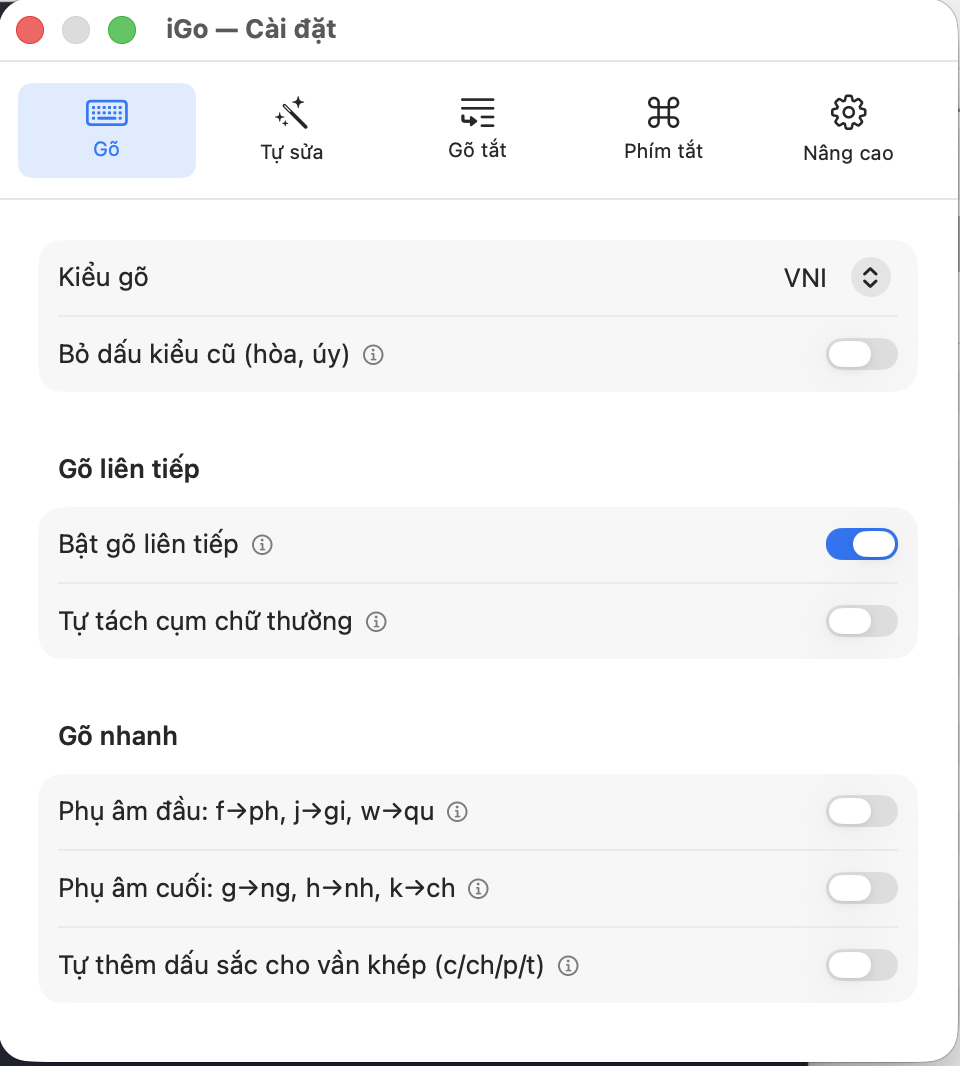
Typing style
Typing style: Telex or VNI
- What it is
- How you type tone marks and a few special Vietnamese letters (ă, â, ê, ô, ơ, ư, đ) using a regular keyboard (no dedicated tone-mark keys).
- What you get / when to use it
- Telex: type letters to add tone marks — e.g. typing
vieejtgives "việt" (doubling "e" makes ê, typing "j" adds the nặng tone). Familiar to long-time Unikey/Telex users. - VNI: type numbers to add tone marks — e.g. typing
viet65gives "việt" (6 adds the ê circumflex, 5 adds the nặng tone). Handy if you're used to typing numbers or find continuous letter-typing uncomfortable. - Either style works fine — it's just a typing habit and doesn't affect the resulting text.
- Default
- Telex.
- Note
- Switch styles anytime with nothing lost — it only affects what you type after switching.
Old-style tone placement (hòa, úy)
- What it is
- Vietnamese has two ways to place the tone mark for certain words, e.g. "hoà" vs. "hòa", "uý" vs. "úy" — both are pronounced the same, only the mark's position differs.
- What you get / when to use it
- Turn this on if you're used to the old placement (hòa, úy — mark on the first vowel). Leave it off for the modern style commonly seen in newer textbooks (hoà, uý — mark on the main vowel).
- Default
- OFF (uses the modern style: hoà, uý).
- Note
- This only affects tone-mark placement — it never changes a word's meaning or pronunciation.
Continuous typing
Enable continuous typing
- What it is
- Lets you type several syllables run together with tone marks still landing correctly, instead of having to pause (press space) after every syllable.
- What you get / when to use it
- Useful for typing PascalCase names, like variable or file names such as
CongHoaXaHoi. Example: type "iGo" then "3" (VNI style) to add a tone — with this OFF, the tone might wrongly land on the first "i" (giving "ĩGo" — wrong); with it ON, the tone lands correctly on what you just typed (giving "iGõ" — correct). - When enabled, start a new syllable by typing its first letter in UPPERCASE — a reliable way to always "break" into the next syllable.
- Default
- OFF.
- Note
- Can be toggled quickly with its own shortcut (see the Shortcuts page) without reopening Settings.
Auto-split lowercase clusters
- What it is
- An extra option for "Continuous typing" above — helps iGõ guess syllable boundaries even when you type all-LOWERCASE syllables run together (no need to capitalize the first letter).
- What you get / when to use it
- Turn this on if you often type several lowercase syllables together and don't want to capitalize each one. Convenient, but can occasionally guess wrong on ambiguous clusters (e.g. ones that could be mistaken for a run-together English word).
- Default
- OFF.
- Note
- If iGõ guesses the break point wrong, type an UPPERCASE letter at the start of the next syllable to split it manually — this always works whether this option is on or off.
Quick typing
Initial consonants: f→ph, j→gi, w→qu
- What it is
- Type one letter at the START of a word to get the matching two-letter consonant cluster right away.
- What you get / when to use it
- Type
fat the start of a word to get "ph",jfor "gi",wfor "qu" — saves typing two letters for one sound. Example (Telex style): typefamjto get "phạm"; typewento get "quen". - Default
- OFF.
- Note
- Only applies to the FIRST letter of a new word — typing f/j/w in the middle of a word still produces that exact letter, unchanged.
Final consonants: g→ng, h→nh, k→ch
- What it is
- Automatically expands a single letter at the END of a word into the matching final consonant cluster, when that single letter wouldn't form a real word on its own.
- What you get / when to use it
- Typing
bagautomatically gives "bang" (instead of typing the full "bang"); similarly "h" becomes "nh" and "k" becomes "ch". iGõ is smart enough not to change anything when you type the full cluster directly — e.g. typing the full "bang" (b-a-n-g) still gives "bang", not "banng". - Default
- OFF.
- Note
- Only auto-expands when the single letter wouldn't form a valid word — if unsure, just type the full letters as usual; this feature won't change anything in that case.
Auto-add acute tone for closed syllables (c/ch/p/t)
- What it is
- In Vietnamese, a word ending in c, ch, p, or t (called a "closed syllable" — e.g. "sách", "học") must always carry either the acute or the heavy (nặng) tone — it can never be toneless. This feature automatically adds the acute tone the moment you finish typing such a word, before you've had a chance to add a tone yourself.
- What you get / when to use it
- Saves you one tone keystroke for words ending in c/ch/p/t. Example: typing
sach(no tone yet) automatically gives "sách"; typinghocautomatically gives "hóc". If you meant the heavy tone (e.g. wanting "học"), just go ahead and type the heavy-tone key as usual — the auto-added acute tone will be replaced by the heavy tone you just typed. - Default
- OFF.
- Note
- If you delete the last letter so the word no longer ends in c/ch/p/t, the previously auto-added acute tone is automatically removed too, to stay correct.