iGõ User Guide
iGõ is a Vietnamese input method for Mac, supporting two familiar typing styles — Telex and VNI. This page explains every setting, so you can tune iGõ exactly the way you want.
Turning Vietnamese typing on/off
While iGõ is running, you'll see a small icon in the menu bar (top of the screen, near the clock). Click it to open a quick menu where you can turn "Vietnamese" on/off or choose Telex/VNI.
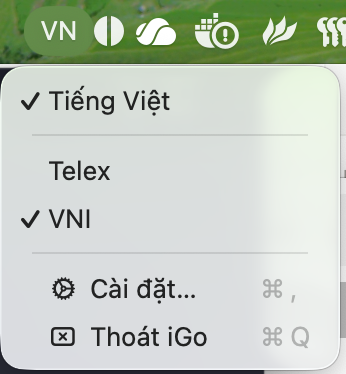
Faster: use the shortcut (default Control+Shift+Space) to toggle Vietnamese right where you are, without leaving the keyboard. You can change this shortcut on the Shortcuts page.
Granting iGõ permission (one-time only)
For iGõ to type into every app on your Mac — including your browser, Mail, VS Code — macOS requires you to manually grant it two permissions:
Accessibility and Input Monitoring, under System Settings → Privacy & Security. Open each section, find "iGo" in the list, and switch it on. If iGo isn't listed yet, open the iGo app once, then go back to System Settings to grant permission.
This is a macOS requirement for any non-Apple input method — not something specific to iGõ — and iGõ never reads or writes anything other than typing on your behalf.
Table of contents
- Type VietnameseThe full Telex and VNI keyboard tables — learn to type tone marks in 2 minutes.
- TypingTelex/VNI typing style, typing multiple syllables in a row, quick-typing shortcuts.
- Auto-correctAutomatically fixes common spelling mistakes as you type.
- ShorthandType a short key to expand it into a longer phrase, with your own shorthand table.
- ShortcutsChange the key combinations used to toggle and control iGõ.
- AdvancedLaunch at login, debug logging, contributing improvements — for anyone who wants to dig deeper.
- AccountSign in, sync settings across machines, view usage statistics.