Shortcuts
Change the key combinations used to toggle and quickly control iGõ without taking your hands off the keyboard.
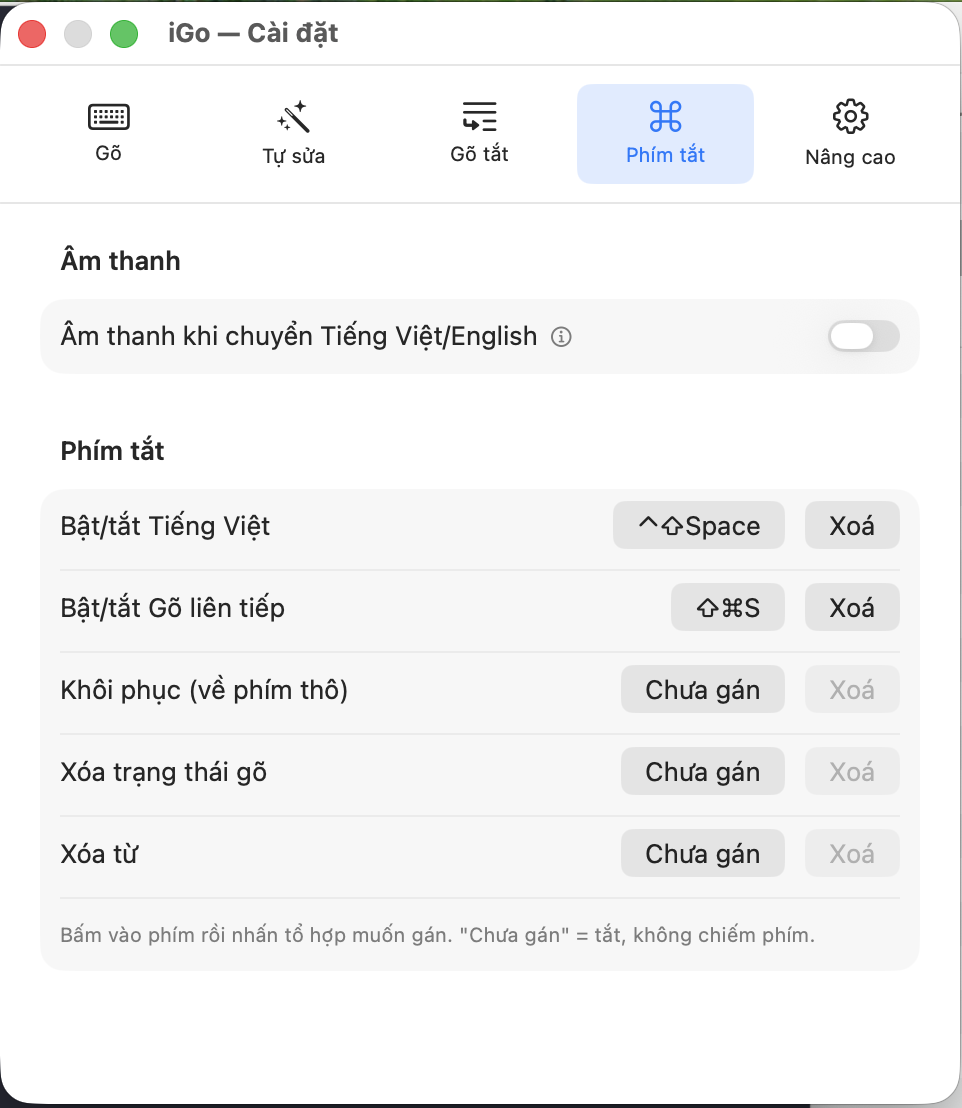
Sound
Sound when switching Vietnamese/English
- What it is
- Plays a short "click" sound each time you toggle Vietnamese typing mode on or off.
- What you get / when to use it
- Turn this on if you want an audio confirmation, so you don't have to glance at the menu bar icon to know which language you just switched to.
- Default
- OFF.
Shortcuts
How to assign a shortcut
- What it is
- Each row in the list below is an iGõ action, with a field showing its currently assigned key combination (or "Unassigned" if none is set).
- What you get / when to use it
- Click the key combination field (the button changes to "Press keys…"), then type the combination you want to use (it must include at least one of Control/Shift/Option/Command — a bare key alone won't be accepted). Click "Delete" next to it to remove it, returning it to "Unassigned".
- Note
- "Unassigned" means completely off — that action won't occupy any shortcut, and it won't conflict with other apps' shortcuts.
Toggle Vietnamese
- What it is
- Switches between typing Vietnamese and typing plain English (raw keyboard, no tone marks, no transformation at all).
- Default
- Control+Shift+Space.
Toggle continuous typing
- What it is
- Quickly toggles the "Continuous typing" feature (covered on the Typing page) on the spot, without reopening Settings.
- Default
- Control+Shift+S on a fresh install (if you've used an older version of iGõ, your existing shortcut is kept as-is).
Restore (to raw keys)
- What it is
- Cancels all Vietnamese transformations for the word you're currently typing, restoring the exact raw keys you just pressed — as if you'd never typed any tone marks for that word.
- What you get / when to use it
- Use this when iGõ misunderstands what you meant and you want to get back exactly what you typed, so you can correct it by hand from scratch.
- Default
- Unassigned.
Clear typing state
- What it is
- Clears the "working memory" of the word you're currently typing, WITHOUT deleting the text already shown on screen.
- What you get / when to use it
- Use this when you want to start typing a completely new word right at the current cursor position, without iGõ mistakenly thinking you're continuing the previous word (for example, after using the mouse to move the cursor elsewhere).
- Default
- Unassigned.
Clear word
- What it is
- Quickly deletes the entire word you're currently typing — both on screen and from iGõ's working memory — as if you'd pressed Delete (Backspace) repeatedly until that whole word was gone.
- What you get / when to use it
- Faster than pressing Delete repeatedly when you want to remove an entire word you just mistyped.
- Default
- Unassigned.